Simon Coulthard October 15, 2026
- TL;DR
- What actually happens when you connect an AI to your analytics
- 1. It has no idea what "normal" looks like on your site
- 2. It counts visits. It cannot see behavior
- 3. It is doing statistics with a tool built for language
- 4. It waits to be asked, and finds nothing on its own
- The chat isn't the problem. What's underneath it is
- What Growth Engine does before any AI is involved
- Then, and only then, you talk to an AI
- LLMs vs. Growth Engine at a glance
- The whole difference
Why "Ask ChatGPT About My Analytics" Won't Build a Content Strategy
The problem isn't the chat window. It's the limited data it has access to in the first place.
You probably know how these tools work by now, or you've heard about it from LLM advocates.
Someone connects ChatGPT or Claude to their analytics account, types "what should I write about next?", and gets a confident, well-formatted answer in seconds. It looks like the end of content planning as we know it.
But here's the thing: it isn't. It is a very good showcase of a very limited thing, and the gap between the two is where content strategies go to die.
TL;DR
Connect ChatGPT to your analytics and you get a smart assistant handed the wrong data: a snapshot with no baseline, traffic counts with no behavior, statistics done by a language model, and silence until somebody asks. The result is a fluent list of your biggest pages, not a strategy. Growth Engine reverses the order. It scores every topic on what visitors actually do, sorts them with fixed rules, writes up the opportunities, and only then hands TWAIA a finished brief. The chat comes after the math, not instead of it.
Subscribe to the Newsletter →
Stay up to date with TWIPLA. Get product updates, practical insights, and industry news delivered to your inbox.
What actually happens when you connect an AI to your analytics
The connection in that setup is usually an MCP, short for Model Context Protocol: an open standard that lets an AI assistant talk to outside software, in this case your analytics account. Think of it as a plug adapter between your data and the chatbot.
For a one-off question, it is useful. "Which pages lost traffic last week?" is a fine thing to ask, and you will get a reasonable answer.
A content strategy is not a one-off question. It is a standing decision about where your team's time goes, made against the whole of your site's history. Hand that decision to an assistant reading raw analytics and four things go wrong, every time.
1. It has no idea what "normal" looks like on your site
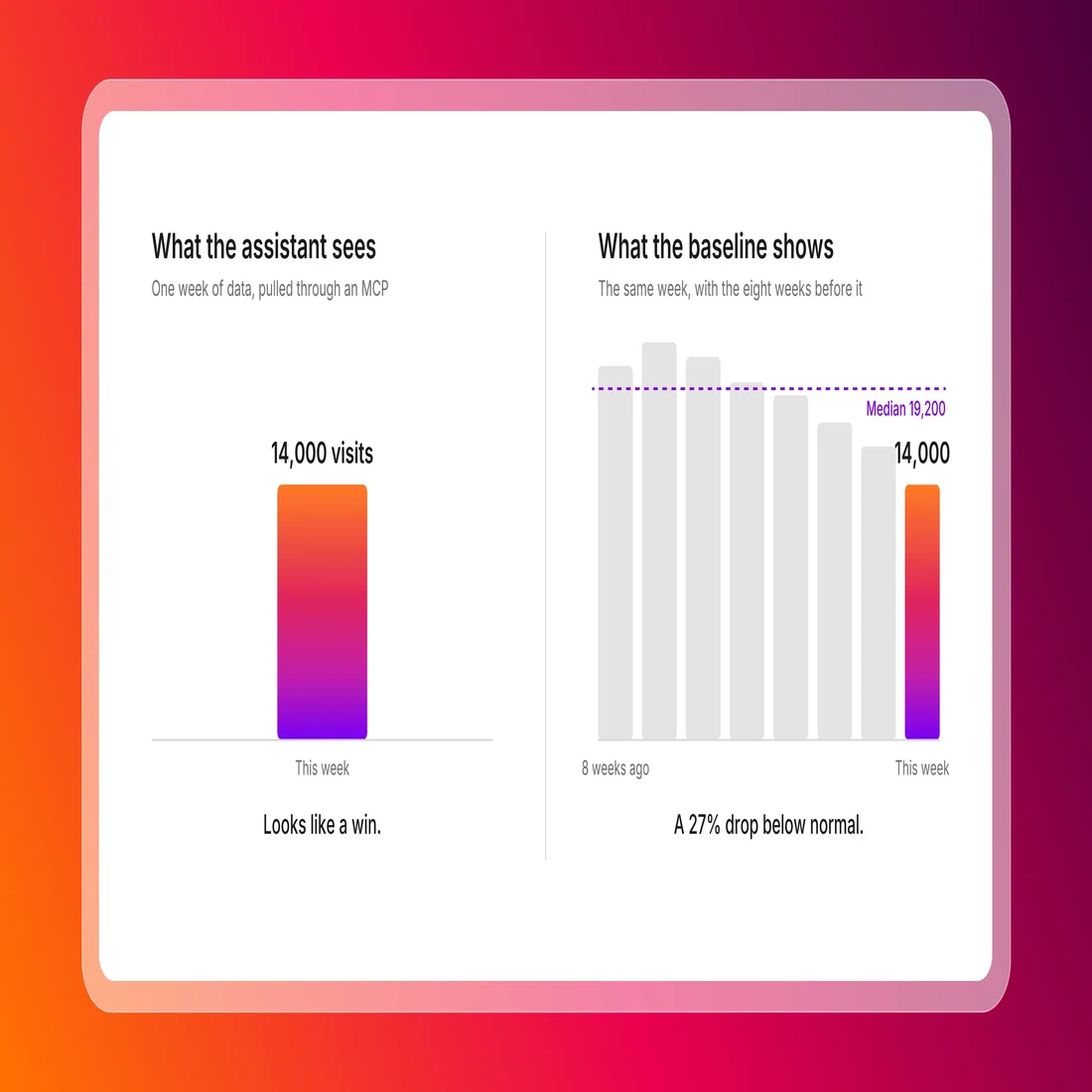
A trend is a change against a baseline. So to know whether a topic is rising in popularity, you have to know how it usually performs. And to know if it's underperforming, you need to understand how it usually does on your site.
When an AI assistant pulls data in through an MCP, it's only accessing a snapshot of the data stored in your analytics account.
So it'll digest, for instance, your website's top 20 pages from the last week. But it lacks context because it doesn't have the 30-day median for every topic you've covered on your site.
To build one, it would have to request history for every topic, compute the medians itself, then compare each against today. But it won't do that, and nor will it ask you for this information.
On a site of any size that is thousands of rows per question, paid for by the word (assistants process text in units called tokens), slow, and prone to timing out. So the assistant does what it can with the snapshot. It tells you your biggest pages are your biggest pages.
2. It counts visits. It cannot see behavior
This is the one worth pausing on.
Almost every trend tool, and every AI tool reading raw analytics, ranks topics by counting: sessions, page views, clicks. Counting tells you people arrived. It tells you nothing about what they did next.
What makes a page valuable is that visitors scrolled, stayed, went deeper into your site, or converted.
Those are behavioral signals: scroll depth, continuation rate (did they go on to another page or leave), conversion rate. They live in a different layer of data from the counts, and a tool that can't see them is judging your content by the size of the crowd at the door.
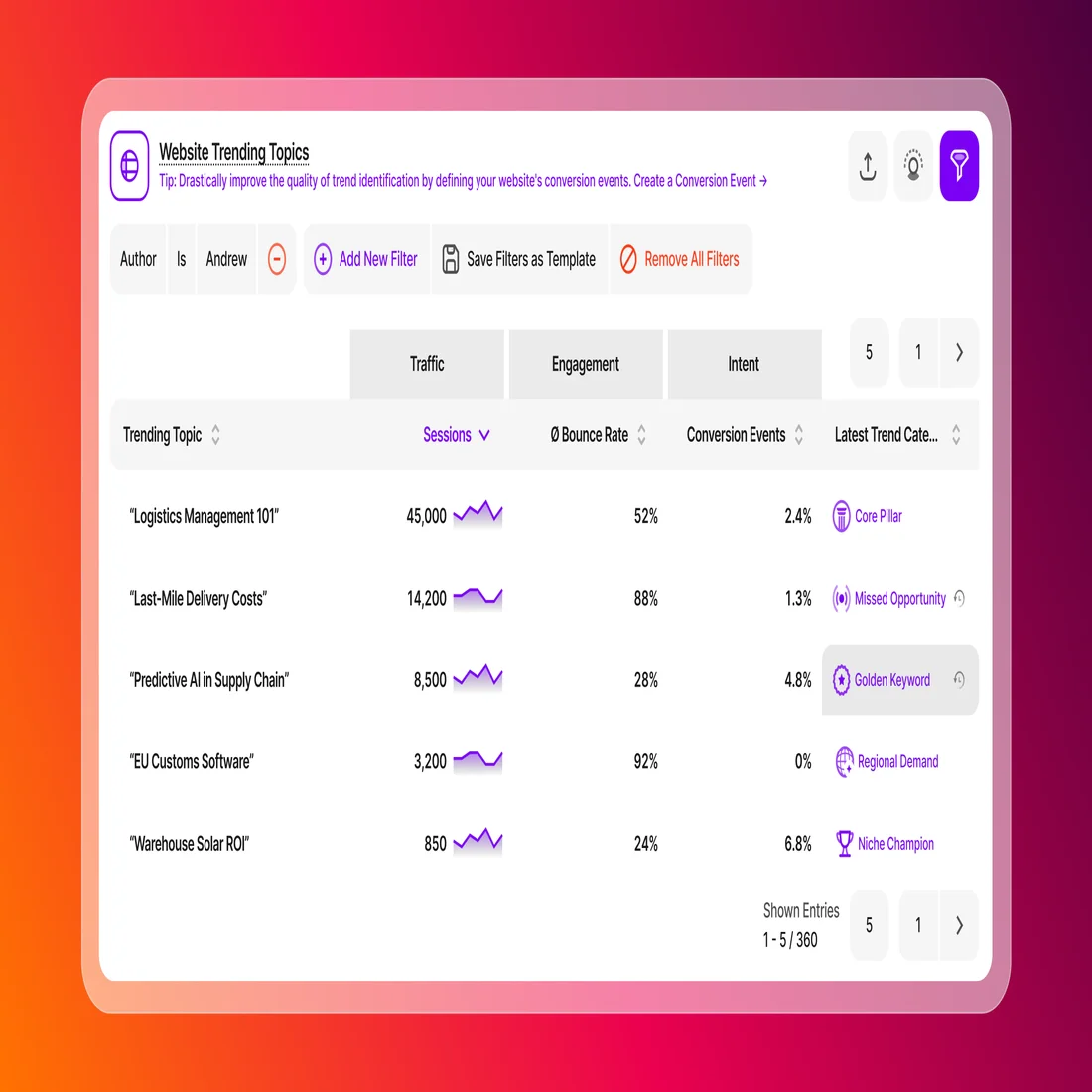
Take a page pulling 14,200 sessions a month with an 88% bounce rate and 15 seconds on page. A traffic-only assistant calls it a success: big number, top of the list, "write more like this." In reality it is the most expensive page on your site. Visitors arrive with a question, don't find the answer, and leave. That is a Missed Opportunity that could well be doing more harm than good to your brand, and a counting tool will never find it, because on every metric it can see, the page is winning.
3. It is doing statistics with a tool built for language
Language models are extraordinary at predicting text. But they are not calculators (just ask one to count the number of characters in copy and see what it says).
Ask one to find every page performing 50% above your site median and it will give you a fluent, confident list. Some of the numbers will be wrong, and you can't tell which from the outside.
The only way to check is to do the math yourself, at which point you didn't need the assistant in the first place. Fine for a brainstorm. Bad for deciding where three months of writing goes.
4. It waits to be asked, and finds nothing on its own
An MCP setup sits idle until someone opens a chat window. If nobody thinks to ask "did any of my posts lose engagement this month?", nobody finds out, and content opportunities have a shelf life. A topic rising today is crowded in three weeks, and you'll have missed your chance because you're relying on a standalone LLM that feigns intelligence.
And when you do ask, the answer is only as good as the question. Most people don't know to ask an assistant to "cross-reference scroll depth against conversion rate and surface high-traffic pages with weak intent". They ask "what's performing well?", get their top ten pages, and think their analytics work is done.
The chat isn't the problem. What's underneath it is
Notice that none of those four failures is about the chat window. They are all about what the assistant is handed: a snapshot instead of a baseline, counts instead of behavior, raw rows instead of finished analysis, and silence until somebody types.
Fix what's underneath and a conversation with an AI becomes the best part of the process rather than the weakest. That is the order Growth Engine, TWIPLA's content tool, is built in. The analysis happens first, on data an assistant reading a traffic API can't reach. The chat comes after the math, not instead of it.
What Growth Engine does before any AI is involved
Growth Engine groups every page on your website into topics and watches how each one performs on three things:
- Volume (sessions)
- Engagement (scroll depth)
- Intent (conversion rate, or continuation rate if no custom conversion events have been defined)
Each score is compared against your own site's medians, computed and kept current in the background, so there is no thousand-row question to run and no assumptions made.
The sorting is done with fixed rules, the same input always producing the same answer, the way a spreadsheet formula does.
That is what lets Growth Engine say a topic is definitively a Golden Keyword (high traffic, high engagement, high intent), a Niche Champion (small audience, strong signal), a Core Pillar (steady foundation), or a Missed Opportunity (high traffic, low engagement or intent), with more categories on the way.
Every topic keeps its category history, so you see a Golden Keyword slipping before it becomes a Missed Opportunity.
From those categories, Growth Engine writes up Content Opportunities: what the data shows, why it matters, a step-by-step playbook, and the projected lift in sessions and conversions.
The list arrives sorted by impact score, so you start with the one that pays off most. It refreshes on a schedule you set, every 3, 6, 12 or 24 hours, whether or not anyone is logged in. You don't prompt it. It brings the finding to you.
And because it sits inside a complete analytics solution with 17 interconnected tools, the behavioral layer is already there. The scroll depth and conversions it scores are the same data behind TWIPLA's heatmaps, session recordings and conversion tracking. If a Missed Opportunity turns up, a recording of that page shows you exactly where visitors give up. No assistant reading a traffic API will ever have that.
Then, and only then, you talk to an AI
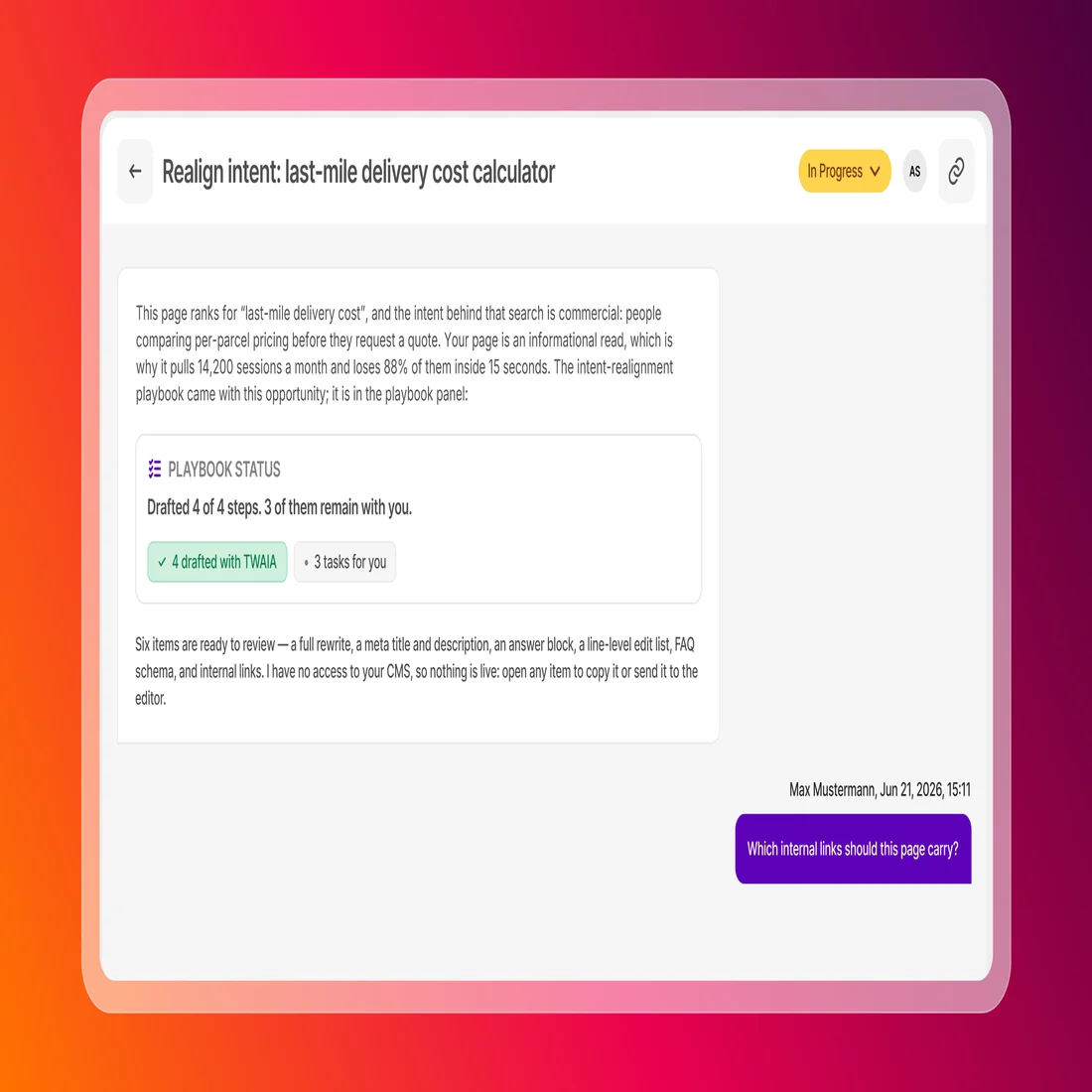
Open an opportunity and you land in a workspace with TWAIA, the AI assistant built into TWIPLA, scoped to that one opportunity. This is a chat window, and it is nothing like the one you get from a standalone LLM.
The difference is what it already knows. Before you type a word, TWAIA has the topic, the category, the baselines it was measured against, the visitor behavior that proves the gap exists and the playbook for closing it. That context is fed in by Growth Engine, independent of anything you ask. You are not explaining your site to an assistant. You are working through a finding with one.
Approve the playbook and the assistant works through it. The outcomes are concrete: the rewritten page, the new meta title and description, the answer block for AI search, the line-by-line edit list. Each one opens in the editor with a click. Every draft follows a content profile you set up once, covering tone of voice, target audience, sector, language, length, calls to action and image placeholders, and you can keep more than one, so a social post and a landing page don't come out sounding the same. When you're happy, export as .md or .html to wherever you publish.
Ask ChatGPT about your analytics and you get a smart assistant with no idea what normal looks like. Ask TWAIA about an opportunity and the analysis is already done, the numbers are already checked, and the only thing left to decide is how you want it written.
LLMs vs. Growth Engine at a glance
| ChatGPT or Claude plus an analytics MCP | Growth Engine | |
|---|---|---|
| What the AI is handed | Raw rows in a snapshot | A validated opportunity with baselines, behavior and a playbook |
| What it sees | Traffic counts | Traffic, scroll depth and intent against your site's own baselines |
| Who does the math | The language model, at question time | Fixed rules, before any AI is involved |
| When it runs | When someone remembers to ask | On a schedule you set, as often as every three hours |
| What you get | A list of your biggest pages | Categorized topics, ranked opportunities, a playbook, a projected lift |
| After the idea | A blank prompt and a chat that forgets | TWAIA drafts the page, the meta, the answer block; export as .md or .html |
The whole difference
Growth Engine watches every topic on your site around the clock, scores it on what visitors actually do, gets the math right before an AI reads it, and then hands TWAIA a finished brief. The chat comes after the math. That is the whole difference.
Share article


Get Started for Free
Gain World-Class Insights & Offer Innovative Privacy & Security

You might also like




Read next


 15 October 2026 - by Simon Coulthard