


Simon Coulthard October 26, 2026
- Growth Engine: Your visitors already told you what to write next
- Three things to do before your first opportunities land
- Webinar: You're creating great content. Here's why you can't prove it.
- Live Event: The 80% other analytics tools miss
- Notifications: Get an email when your traffic spikes or plunges
- Metrics: Measure page engagement with scroll depth
- Export: Download your pages table and graph as PNG or PDF
- Tables: Resize, reset, or hide table columns
- That's a Wrap for Platform News October 2026
Platform News - October 2026

Hello again, and welcome back to Platform News. It's been a few months, and there's a good reason for that: we've been building our completely new Growth Engine module.
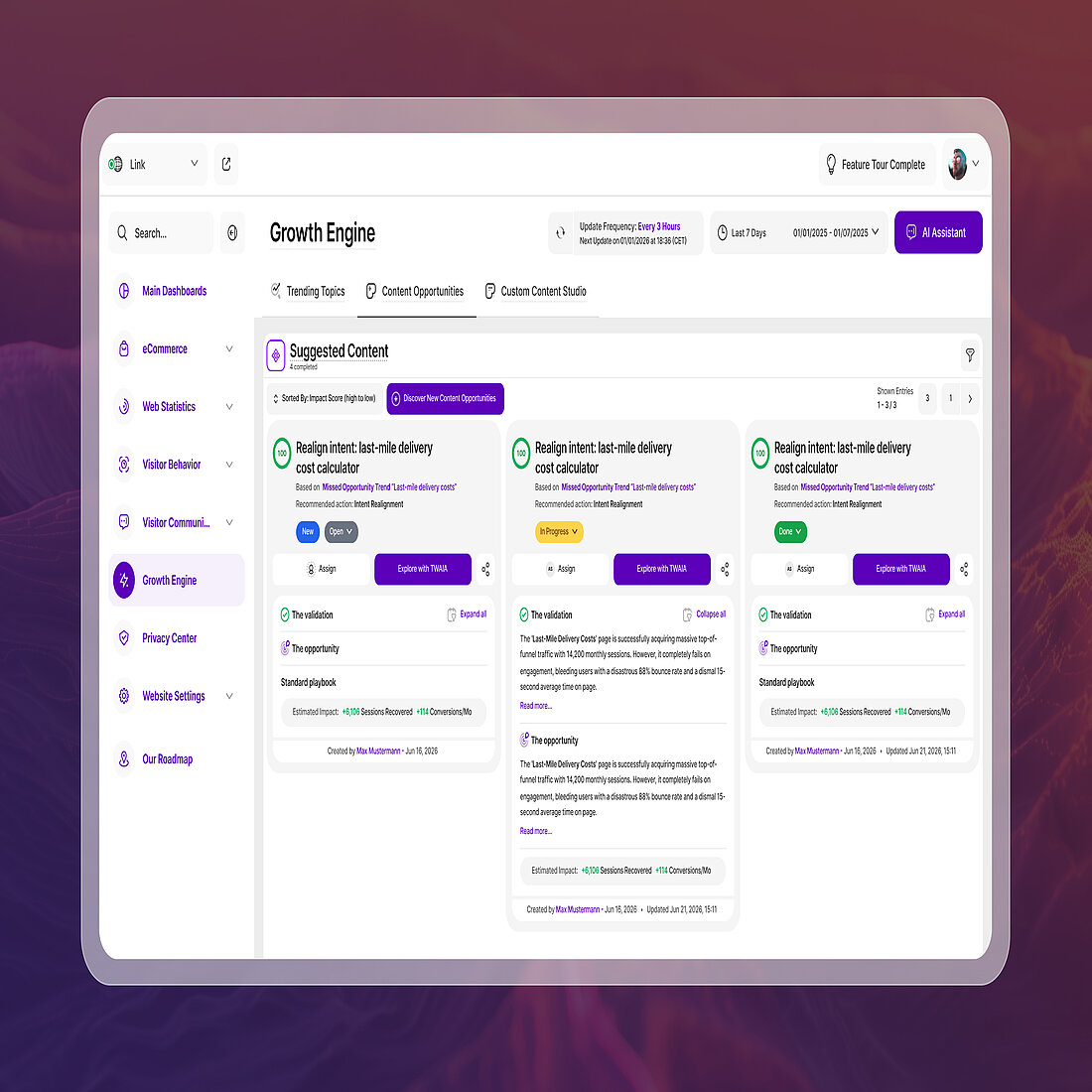
You spoke. We listened. TWIPLA can now analyze your entire website, using advanced metrics and your visitors' behavior, and suggest the content opportunities most likely to improve your performance. All of it based on your own website data and trending topics, validated with facts.
Each one comes with a concrete playbook of actions. Work through them yourself, or have TWAIA validate them or carry them out for you. Alone or as a team.
Try the early alpha for free and tell us what you think. Many more features and new content opportunity types are coming in the weeks ahead.
Also in this issue: our September webinar with WP Engine on proving what your content is worth, and Dragos at DMEXCO on the 80% of visitors other tools never see.
Plus a run of platform updates, including email alerts when your traffic spikes or plunges, scroll depth on every page in your Pages Dashboard, graph exports to PNG and PDF, and tables you can finally resize, reset and hide columns in.
Use the table of contents on the left to jump straight to what interests you, or scroll through for the full update.
→ Subscribe to the Newsletter
Stay up to date with TWIPLA. Get product updates, practical insights, and industry news delivered to your inbox.
Growth Engine: Your visitors already told you what to write next
New, with free early access
Growth Engine is live, in alpha, for everyone on a Pro plan or above.
It takes everything TWIPLA knows about your traffic and visitor behavior and automatically generates content opportunities to improve your website's performance: the pages to fix, the topics to write about, and how much traffic and how many conversions each one is worth.
Every opportunity comes with a step-by-step playbook. Approve it and TWAIA drafts the content.
During the alpha it's free on every platform. Each website gets its own budget of AI tokens to spend on opportunities and drafts, and we'll let you know if you're close to using it up. After the alpha, Growth Engine runs on a monthly token allowance included in every plan from Basic up, with top-ups whenever you need more.
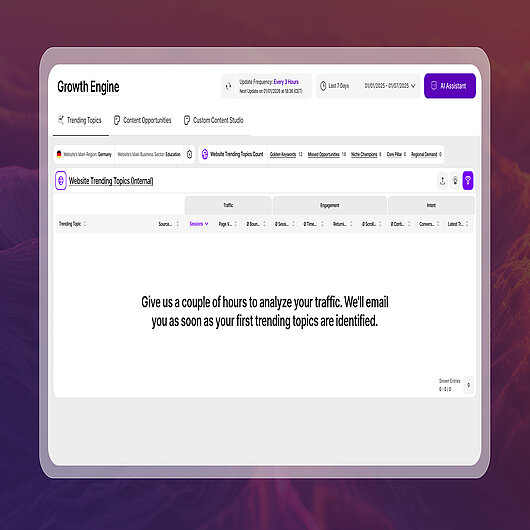
If you’re on Pro or above, it’s already in your account. Your first trending topics show up within a day.
Here's how it works.
- Trending Topics shows you which topics on your site are winning, which are pulling in visitors and losing them, and which are small but quietly converting. Refreshed as often as every three hours.
- Content Opportunities turns that into a to-do list with the numbers attached: what to fix, what to write, how to do it, and the sessions and conversions on the table. Assign each one to a colleague and track it through to done.
- Custom Content Studio does the writing. Approve a playbook and the drafts land ready to edit, following the content profile you set up once. Need something the data didn't ask for? Brief it and it writes that too.
Three things to do before your first opportunities land
- Define your conversion events. Growth Engine works without them, but it's sharper with them. The more it knows about what your visitors came to do, the better the opportunities it finds. Set them up in Conversion & Revenue Tracking and you'll get higher quality opportunities from day one.
- Give it time to learn your site. Think of it like a new colleague: nobody gives great advice after an hour of watching your traffic. A few days of data is the minimum for useful opportunities, they keep improving as the history builds, and a month is ideal. Nothing to do here except leave it switched on.
- Set up a content profile once. Tone of voice, audience, sector, language, article length, how many calls to action. Every draft from then on follows it, so you set it once and never explain your house style again.
Webinar: You're creating great content. Here's why you can't prove it.

Webinar catchup with WP Engine
On 22 September, Jason Konen, Director of Product Management at WP Engine, and Dragos Gal, our Global Head of Enterprise and Strategic Partnerships, took on the gap between what content teams report and what leadership actually asks for. Here's what they covered.
The measurement gap. Most content reporting stops at delivery. How many people arrived, where from, which page. None of it says whether the content did its job. Engagement metrics count. Behavioral signals describe.
Three questions every team should be able to answer about any piece of content:
- Are people actually consuming this once they land on it?
- Where does attention drop off, and why?
- Does it move people toward the outcome we want?
Fail to answer all three and you're guessing, however healthy the traffic looks. The examples made it concrete: content teams finding the exact line where readers stop reading, universities spotting where students abandon course pages, healthcare providers discovering patients scroll straight past the critical information.
A framework for what really matters. The centerpiece was a table connecting four business objectives to the questions and signals behind each one.
| Business objective | Questions to ask | Metrics to monitor | What success looks like |
|---|---|---|---|
| Grow audience | Are the right people finding us? | New visitors, traffic sources, entry pages | Growth in qualified, relevant visitors |
| Drive engagement | Are people consuming our content? | Time on page, scroll depth, return visits | Longer sessions, lower abandonment |
| Generate action | Is the content moving people toward our goal? | Form fills, conversions, sign-ups, downloads | Content-attributed outcomes |
| Improve content operations | Are we creating the right thing efficiently? | Publishing velocity, content lifespan, preference by type | Better output at consistent quality |
Asking AI doesn't close the proof gap. Point a model at delivery stats and it can only tell you to make more of what got traffic. The problem isn't the reasoning, it's what you're reasoning over.
Where to start. Pick one objective. Find one piece of content where you can't answer the three behavioral questions today. That's your starting point.
Live Event: The 80% other analytics tools miss

TWIPLA at DMEXCO
Dragos had a busy September. The day after the webinar he was on the TYPO3 stand at DMEXCO in Cologne, giving a talk called "The 80% You're Not Seeing". It takes on a problem most analytics setups live with quietly.
Somewhere between 30% and 80% of visitors are gone before measurement even starts. Four things cause it:
- Visitors who decline the consent banner
- Ad blockers, which roughly a third of German internet users run and some studies put above 40%, and which block analytics scripts as well as ads
- Browsers like Safari, Firefox and Brave that block cookies by default, with others heading the same way
- Cookie banners nobody needed technically, suppressing traffic the site was always allowed to measure
The people lost this way aren't a random sample. So it isn't that these teams measure the wrong things. They measure the right things on a minority, then report it as the whole.
One question exposes any tool calling itself privacy-friendly: does it need a consent banner? If it does, it's storing something on the visitor's device, and everyone who declines vanishes. GDPR-friendly describes the paperwork, not the coverage.
Sovereignty is the other half. Where is the data processed, including backups and support access? Who else can reach it, and do any of them sit under third-country jurisdiction? And what leaves the device at all?
You're already on the right side of this.TWIPLA needs no cookies and no consent banner, so none of those four things applies to you. Two minutes well spent, though: check you're running first-party tracking on your own domain, and that nobody has switched you into consent-based mode for a legal review and left it there. Those two settings are the difference between seeing everything and seeing what everyone else sees.
Then spend the attention where it pays. Your best page is often your worst page. High traffic, shallow scroll, nobody continuing means you won the attention and failed to answer the question. Traffic-only reporting files that as a success, while the quiet page pushing nearly everyone deeper into your site doesn't register at all.
Notifications: Get an email when your traffic spikes or plunges
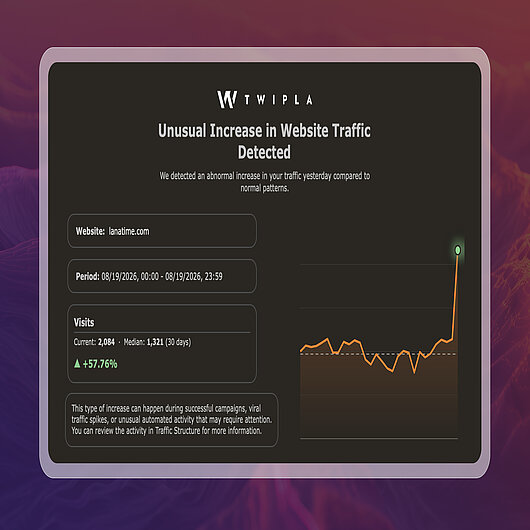
You shouldn't have to be looking at a dashboard to find out something unusual happened. Traffic anomaly alerts now watch your site for you and email you the moment anything out of the ordinary shows up.
Every day, TWIPLA takes a reading of your sessions, page views and visitors and compares each one to your site's own median over the last 7, 14 or 30 days, whichever you choose. If a metric comes in at more than 1.5 times the median, you get a spike alert. If it drops below half, you get a plunge alert. Each email shows the website, the day, the current figure against the median, and the percentage change, so you can tell at a glance whether it's a campaign landing or a tracking code that fell off.
Alerts go out once per day per type, and the feature needs a day or two of data before it has a median to compare against.
Switch it on under Settings → General → Traffic Anomalies Email Reports, add the addresses that should receive them, and pick your comparison period.
Metrics: Measure page engagement with scroll depth
Available in the Pages Dashboard & Real-Time Analytics
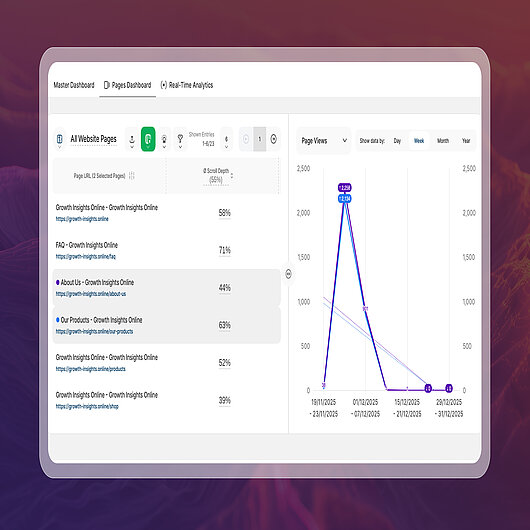
Scroll Depth is now available in both the Pages Dashboard and Real-Time Analytics, adding another layer of page-level engagement insight to TWIPLA.
It shows the average percentage of each page viewed during the selected reporting period, making it easier to compare engagement across pages and understand how deeply visitors interact with your content.
The new metric can be sorted alongside every other page engagement metric, making it easy to compare performance across an entire website.
In the Pages Dashboard, simply select Scroll Depth from the chart's metric menu to visualize how page engagement changes over the selected reporting period.
Meanwhile, Real-Time Analytics table view surfaces the same metric live, allowing you to monitor visitor engagement as it happens.
Hot Tip: Use the new Scroll Depth metric to identify pages with unusually high or low engagement, then activate a Scroll Depth Heatmap to start seeing exactly where visitors stop scrolling. Heatmaps begin collecting data from the moment they're created, so enabling them early on important pages provides the richest visual insights.
Export: Download your pages table and graph as PNG or PDF
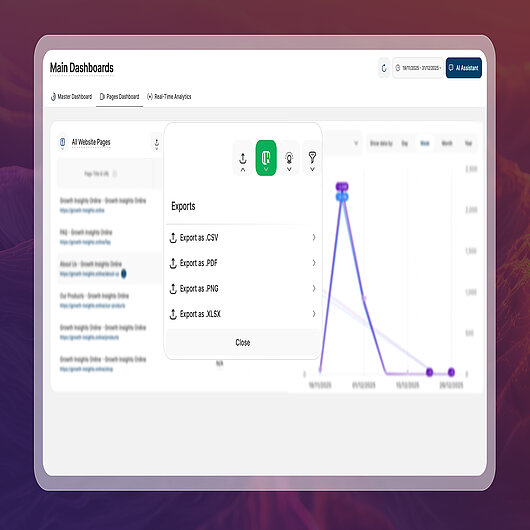
A power user asked for this one, and it turned out plenty of you wanted it too. The All Website's Pages report could already export its data as CSV or XLSX. Now you can export the whole view, split table and line graph together, as a PNG or PDF from the same export menu.
The export is exactly what's on your screen: the pages you've selected in the split table, their lines in the graph, and any filters you've applied. So the view you spent a minute setting up drops straight into a report or a slide, no screenshot, no cropping.
Tables: Resize, reset, or hide table columns
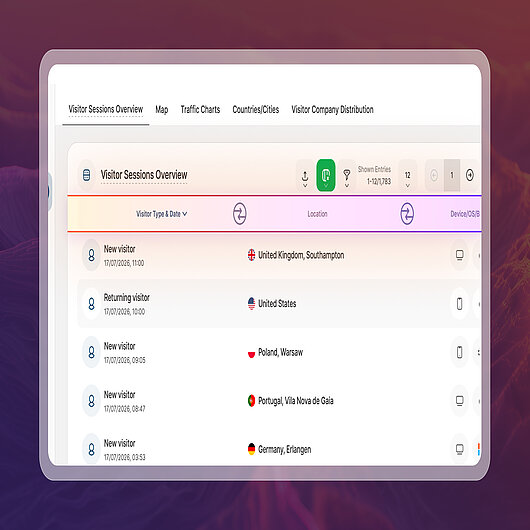
Working with large datasets is now more flexible across TWIPLA.
Drag any column border to resize it, open the column menu to reset its width or hide it completely, and tailor each table to the way you work.
Available across every table report block in the platform, this marks the final enhancement in our recent series of usability improvements for complex tables.
That's a Wrap for Platform News October 2026
Thanks for reading. We hope these latest improvements help you get even more from TWIPLA, and we'll be back next month with more features, enhancements, and platform updates.
Until next time, happy insights.
Share article


Get Started for Free
Gain World-Class Insights & Offer Innovative Privacy & Security


 28 June 2023 - by Simon Coulthard
